Web
WackyStuff, Offline QR File Transfer
Send a file between two devices with no network at all: one screen loops QR frames, the other device's camera reads them back, and nothing is handed over until a SHA-256 of the reassembled bytes matches. Static HTML and vanilla JavaScript, no build step.
- Built
- Sep 2026
- Standard QR codes per colour frame
- 3Standard QR codes per colour frame
- Server calls, ever
- 0Server calls, ever
- Manifest repeat interval
- ~3 sManifest repeat interval
- Colour error /255 after unmixing, simulated
- 75 to 1.4Colour error /255 after unmixing, simulated
Overview
WackyStuff is a dashboard of small front-end-only tools, and its first two tools move files between devices with no network connection: one screen shows a looping animation of QR frames, and a phone or laptop camera on the other device reads them. No server, no pairing, nothing leaves either device.
There is no acknowledgement channel, so the design does not need one. The sender loops every frame forever and the receiver's job is purely additive: keep the first good copy of each chunk until the set is complete and the whole-payload hash matches. A missed or misread frame costs one more loop, never a corrupt file.
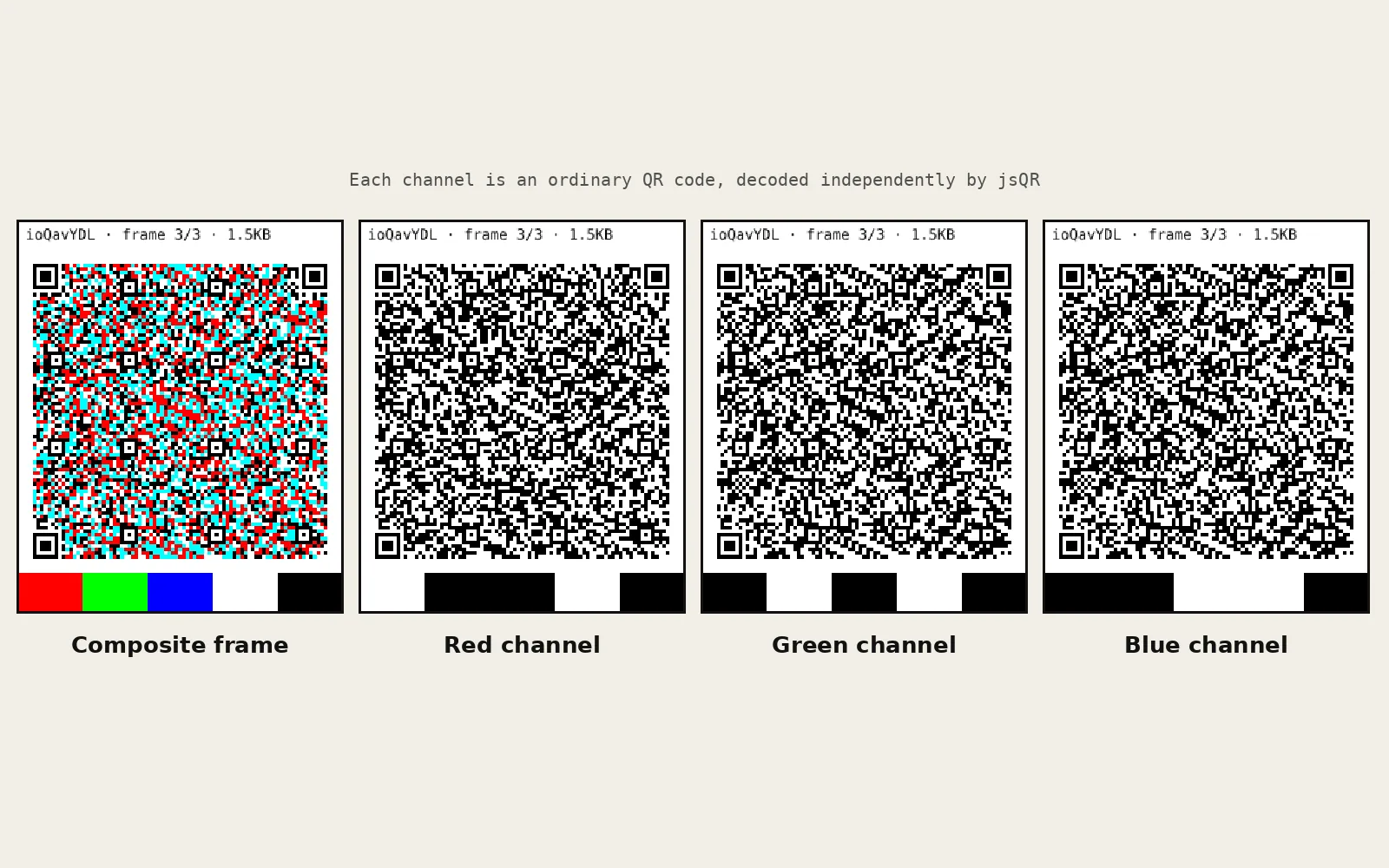
The colour page is where the interesting decision sits. Dense custom colour symbologies exist, but they need a from-scratch decoder that has to survive white balance, compression and uneven light. Packing three standard QR codes into the R, G and B channels of one image gets up to three times the payload per frame while reusing a mature encoder and decoder unchanged.
Screens
Architecture
payload (file or text)
   │
   ├─► manifest   id · size · chunkCount · sha256   (every ~3 s)
   ├─► chunks     id · i · n · crc32 · base64 data
   │
   ├─► B/W page     1 chunk   →  1 QR frame
   └─► Colour page  3 chunks  →  R, G, B channels of 1 frame
                         │
        screen  ──────►  camera        no network
                         │
   receiver   split channels → jsQR on each → CRC32 check
              collect until every index is present
SHA-256 must match → download or copyWhat it does
- Colour QR transfer: three QR codes packed into the RGB channels of one image, up to three times the payload per frame of the black and white page.
- Black and white QR transfer: the same protocol on plain QR codes, slower but maximally compatible.
- Files or text in, download or copy out, with the original filename and MIME type preserved.
- Selectable error correction (M by default, H for noisy conditions) and three data-per-frame tiers: 260, 500 and 750 bytes.
- Live estimate of frames needed and loop time before sending, a nudge towards Bluetooth or USB above 300 KB, and a hard stop above 20 MB.
- Frame rates up to 120 fps, with the display's real refresh rate detected and shown so a higher setting is not a false promise.
- A tool dashboard driven by one config file: adding a tool is one entry, and it appears on the dashboard and in the shared nav.
How it works
- Every payload gets a manifest (session id, size, chunk count, SHA-256) re-sent every ~3 seconds, so a receiver that starts late waits seconds rather than a whole loop.
- Four integrity layers: QR's own Reed-Solomon correction, a CRC32 per chunk, a session id so two transfers never mix, and a SHA-256 over the reassembled bytes before anything is offered back.
- The three density tiers were chosen so no tier and error-correction combination can overflow a version 40 QR code at level H (1,273 bytes): with about 80 bytes of JSON wrapper and 1.34x base64 expansion, the largest tier lands near 1,080 bytes.
- One QR version is fixed for the whole loop, computed from a synthetic worst-case chunk, so the code never changes size between frames and fights the camera's autofocus.
- A spec-recommended four-module quiet zone is drawn into every frame, with a fixed HUD strip outside the module area.
- Colour frames carry a fixed red, green, blue, white and black swatch strip. The receiver measures the camera's response to each, inverts the 3x3 colour-mixing matrix and retries only the channels that failed raw, so the correction can help but never regress a channel that already decoded.
- Rendering runs on requestAnimationFrame rather than setInterval so it cannot queue a backlog, and scanning uses requestVideoFrameCallback where available to process each camera frame exactly once.
- No framework and no bundler. The QR encoder and scanner are vendored, so the site works offline and from any static host.
Problems and answers
A custom colour barcode needs a new decoder that has to survive real camera colour response.
Put three standard QR codes in the R, G and B channels and decode each with the same proven scanner.
There is no channel for the receiver to say what it missed.
Loop every frame forever and make reception additive, so a dropped frame only costs time.
The QR changed size between frames, which a camera reads as the target moving.
Fix one QR version per transfer from a synthetic worst-case chunk, so every frame renders at the same size.
Video compression and auto white balance bleed colour channels into each other.
Show a fixed swatch strip in every frame, measure the bleed and invert it, applied only as a fallback for channels that fail raw.
A render error inside the loop silently froze the sender on one frame.
Catch per frame, surface the error in the status line, skip the frame and keep looping.
Where it goes next
- Client-side compression before chunking, to cut frame count for text and documents.
- Persisting received chunks to IndexedDB so a receiver can reload mid-transfer.
- Adaptive frame rate driven by the receiver's scan success rate.